 Prowl
Prowl
Signing in to Prowl
Prowl talks to GitHub with a token that stays in your browser (chrome.storage.local) and is
only ever sent to GitHub. There are two ways to get one: approve Prowl on GitHub, or paste a
personal access token (PAT). Both end the same way: Prowl checks the token, shows who you are
and starts following your pull requests.
Which way should I sign in?
| Way to sign in | Access | CI status |
|---|---|---|
| Continue with GitHub | Every repository you can access | Yes |
| Classic token | Every repository you can access | Yes |
| Fine-grained token | One account or organization, and the repositories you pick | Can be missing |
Pick Continue with GitHub when the button is there: there is nothing to copy, and the token is created for you. Otherwise pick a classic token. Choose a fine-grained token only when you want to limit Prowl to a few repositories and can live without CI status.
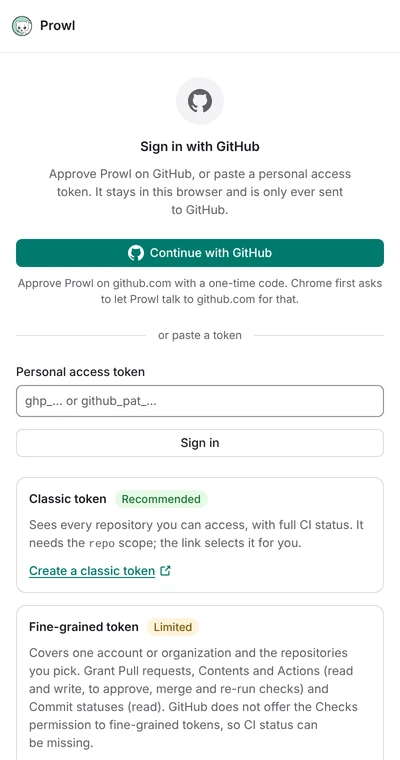
Continue with GitHub
This signs in with an OAuth App through GitHub’s device flow, the same way the GitHub CLI does.
- Choose Continue with GitHub in the side panel.
- Chrome asks to let Prowl access
github.com. Prowl needs it to ask GitHub for a code and to learn that you approved it. Nothing else ongithub.comis read. If you decline, Prowl says so and you can still use a token. - Prowl shows a code such as
WDJB-MJHTand opensgithub.com/login/device. Type the code there and approve Prowl for therepoandread:orgscopes. - Prowl notices the approval within a few seconds and signs you in. The code is valid for 15 minutes, and the panel counts down. Cancel any time, or start again after it expired.
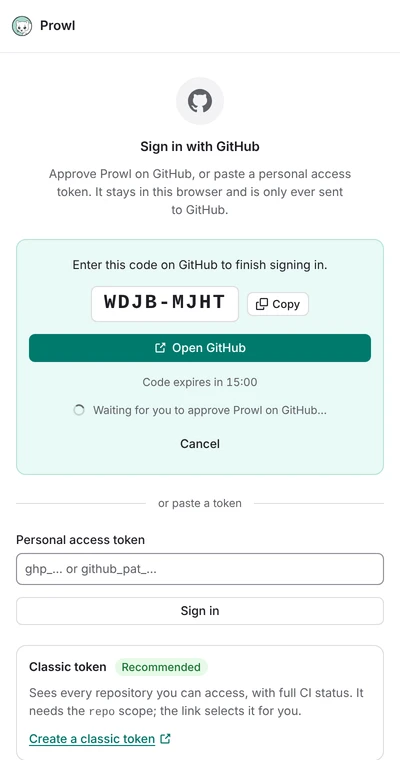
The sign-in only runs while the side panel is open. The repo scope is what GitHub requires to
read private repositories and to approve, merge and re-run checks. read:org lets Prowl list
the teams you belong to, for Team reviews (see Team review requests).
It is read-only: Prowl cannot change your organizations or teams.
Not available in this build
Signing in from the browser needs an OAuth App client id built into the extension. Builds without one (a fork, a local build, or a release made before the id was set up) show “Signing in from the browser is not available in this build” and a link to this page. Use a token instead, or make your own client id:
- On GitHub, open Settings, Developer settings, OAuth Apps, and choose New OAuth App. The callback URL is not used; any URL works.
- Tick Enable Device Flow on the app’s page.
- Build with
PROWL_GITHUB_CLIENT_ID=<your client id> pnpm build. The id is public. Prowl never uses a client secret.
If your organization restricts third-party OAuth Apps, an owner has to approve Prowl first (or you use a token).
Sign in with a token
Paste a token into the field on the same screen. The panel links to GitHub’s token pages with the form filled in.
Classic token (recommended)
- Open github.com/settings/tokens/new (Settings, Developer settings, Personal access tokens, Tokens (classic), Generate new token).
- Name it, choose an expiry and tick
repoandread:org(underadmin:org). Nothing else is needed. - Select Generate token, copy it (it starts with
ghp_) and paste it into Prowl.
repo lets Prowl read private repositories, read CI status, and approve, merge and re-run
checks. To follow public repositories only, public_repo is enough. A classic token without
repo still signs in, but it only sees public repositories, and Prowl warns you. read:org
lists your teams for Team reviews; without it Prowl signs you in with a warning, and Team
reviews may stay empty.
If your organization uses SAML single sign-on, select Configure SSO next to the token on GitHub and authorize it for the organization, or its repositories will be missing.
Fine-grained token
- Open Generate a fine-grained token. The link fills in the permissions below.
- Choose one resource owner (your account, or one organization) and the repositories to include.
- Under Repository permissions, grant:
- Pull requests: read and write (approve, request changes, comment, toggle draft)
- Contents: read and write (merge)
- Actions: read and write (re-run failed jobs)
- Commit statuses: read (CI status from commit statuses)
- Metadata: read (GitHub always grants it)
- Generate the token (it starts with
github_pat_), copy it and paste it into Prowl.
Reading is enough to follow pull requests: Pull requests (read) and Commit statuses (read). Without the write permissions, the action buttons fail with a message from GitHub.
Fine-grained tokens have two limits Prowl cannot work around:
- CI status can be missing. GitHub has no Checks permission for fine-grained tokens, so check runs from GitHub Actions and other apps may be missing from a pull request. Legacy commit statuses still work. Prowl tells you this after signing in.
- One owner per token. A token covers a single user or organization. To follow several, use a classic token. Repositories you only collaborate on from outside an organization are not covered either.
For Team reviews, the resource owner must be the organization, and under Organization permissions grant Members: read. Prowl then sees that organization’s teams only; a token owned by your own account sees none.
If something goes wrong
- “GitHub rejected this token”: the token was copied incompletely, has expired or was revoked. Create a new one.
- “That does not look like a GitHub token”: remove spaces and quotes around it.
- “GitHub refused this token”: usually SAML single sign-on or an organization policy. Authorize the token for the organization (classic) or ask an owner to approve it.
- A private repository is missing: the token has no
reposcope, or it is not authorized for that organization. - No CI status on a pull request: you use a fine-grained token (see above).
- Team reviews says “GitHub would not list your teams”: sign in again with the
read:orgscope (Continue with GitHub asks for it; tick it on a classic token), or give a fine-grained token owned by the organization the Members: read permission. Teams of an organization that requires single sign-on or restricts OAuth Apps appear once the token, or Prowl, is approved there. - “Could not reach GitHub”: check your connection, then try again.
Team review requests
Review requested lists the pull requests that ask you for a review. Requests sent to a
team you belong to are in their own section, Team reviews: Prowl finds your teams (with
read:org, once a day and at each sign-in) and searches each one’s open review requests, up
to 10 teams. Turn the section on in Settings. A pull request that asks both you and one of your
teams shows up in both sections, and counts once in the badge.
Signing out and revoking access
Sign out from the account menu in the panel. Prowl removes the token and the fetched data from your browser, but it does not revoke the token at GitHub. To end Prowl’s access completely:
- For Continue with GitHub: GitHub, Settings, Applications, Authorized OAuth Apps, then revoke Prowl.
- For a token: GitHub, Settings, Developer settings, Personal access tokens, then delete it.